TL;DR
Smart kitchen gadgets use sensors, software, connectivity, or automation to help you cook and manage food, from connected thermometers to refrigerator inventory apps. Start with a recurring task, compare the smart model with a conventional one, and check offline controls, compatibility, privacy, and food-safety instructions before buying.
A thermometer that texts you when a roast reaches its target can save dinner; a refrigerator camera that mistakes yesterday’s leftovers for a new container can add another chore. Smart kitchen gadgets range from simple app-connected tools to appliances that adjust a cooking program automatically, and the word “smart” alone tells you little about how useful they are.

Get kitchen staples and gadgets delivered free with Prime
- Fast, free delivery on millions of items
- Prime Video, Amazon Music and more included
- Member-only deals all year
This guide explains what these gadgets do, which features can help with cooking and food storage, and what to check before paying extra. You’ll see how a connected thermometer differs from a phone-controlled coffee maker, why an app feature may stop working offline, and how to choose a device that still handles its basic job when the internet drops.
You’ll also get practical safety and privacy pointers, plus a short buying process you can use in a store or while comparing product pages. The best addition to your kitchen may be a clever connected tool—or a simpler device that already does the job.
Match the gadget to one recurring task, such as monitoring a roast or keeping a shared grocery list.
Compare connected features with a conventional model; a timer or basic thermometer may do the job.
Check which controls work without Wi-Fi, an account, or a cloud service.
Use app alerts as assistance, and follow food-safety and appliance instructions for cooking and storage.
Review compatibility, privacy settings, software support, total cost, and repair options before buying.
What Smart Kitchen Gadgets Actually Do for You
Smart kitchen gadgets use sensors, software, connectivity, or automation to monitor a task, guide you through it, or control part of it. A connected thermometer measures food temperature and sends an alert; a smart multicooker can offer guided programs; a pantry app can help you track groceries. In plain terms, the device gathers information or follows instructions so you have fewer steps to remember.
The value comes from what happens after the device gathers that information. A temperature reading is useful when it changes your next action: lower the heat, take the roast out, or check whether the center has cooked through. A notification that arrives late, or requires you to keep checking your phone, may simply move the work from the kitchen to the screen. Consider whether the gadget reduces decisions or only gives you another place to manage them.
That can be handy when your hands are covered in flour or you’re juggling dinner and a child’s homework. Imagine putting a probe into a roast, setting a target, and getting an alert while you chop carrots. You still check that the food has cooked safely; the gadget simply means fewer trips to the oven and less guesswork. The tradeoff is that you depend on correct probe placement, a charged device, and a working connection if the alert is sent through an app.
Some products earn the label “smart” through an app notification alone. A coffee maker that you can schedule from your phone may be useful if you often forget to set it the night before, but a basic programmable model may offer the same morning convenience. The useful question is not whether a device connects; it’s whether the connection improves a task you do often. If the smart version costs more or needs an account, that added complexity should buy a benefit you can describe in everyday terms.
A smart feature adds value when it saves effort, improves control, or helps you act on useful information. A notification that only tells you what you already know can be more noise than help.
Products Worth Considering

Ninja Woodfire ProConnect Premium XL BBQ Grill, 7-in-1, App Enabled, Blue

Vitamix VX1 Professional-Grade Blender, 64 oz, Black

Vitamix Touch & Go Advance 32-Ounce Bar Blender, White
As an affiliate, we earn on qualifying purchases.
Choose the Gadget That Fixes Your Most Annoying Kitchen Task
Smart kitchen gadgets suit different routines: thermometers help monitor cooking, scales help measure ingredients, and inventory apps help organize food. The best match depends on the job you want to make easier, how often you do it, and whether a simpler device already handles it well. Frequency matters because a small time saving can add up across a task you repeat daily, while an impressive feature used once a month may not justify its cost or upkeep.
Picture a Sunday dinner with a roast in the oven, soup simmering, and guests arriving at six. A thermometer alert might free you from repeatedly opening the oven; a connected scale may add little if you rarely bake. The tool that fits your week matters more than the one with the longest feature list. Think about the cost of the current problem, too: if overcooking dinner is rare, a basic thermometer might be enough; if it happens often while you’re busy, an alert could make a meaningful difference.
| Gadget | What it can help with | What to check |
|---|---|---|
| Connected thermometer | Monitoring temperature and receiving alerts | Probe range, connection, and how to confirm food is safely cooked |
| Smart scale | Following recipes or sending measurements to an app | App support and whether ordinary weighing still works without it |
| Smart multicooker or oven | Guided programs, presets, or monitoring | Manual controls, remote-start limits, and offline behavior |
| Coffee maker | Scheduling and adjusting brew settings | Whether a regular programmable model offers the same convenience |
| Pantry or refrigerator app | Shopping lists, meal planning, or inventory reminders | How easily you can update items and correct recognition errors |
Each kind of gadget also shifts work in a different way. An alerting thermometer reduces active checking but still needs setup and a reliable signal. A smart scale may make recipe measurements easier to follow, though app dependence can be frustrating when a recipe or phone interface changes. An inventory app can make household shopping more coordinated, but only if everyone updates it consistently. Ask who will maintain the device, not just who will enjoy its feature.
A small leak or temperature sensor near an appliance offers a different kind of benefit: it can alert you to a problem before you spot water on the floor or notice a warm refrigerator. Still, check where the device can sit, how it sends alerts, and what happens during a Wi-Fi outage. An alert is most valuable when it reaches someone who can act; a sensor that reports through a disconnected hub may provide little protection. A feature is useful only when it suits your kitchen and routine.
Check Whether the App, Wi-Fi, and Privacy Settings Fit Your Home
Before buying, check compatibility, offline controls, account requirements, and software support. Smart kitchen gadgets may connect by Wi-Fi or Bluetooth, depend on a manufacturer’s app, or work with a wider smart-home platform. A “smart” label does not guarantee that the device works with your phone, voice assistant, hub, or preferred platform. Compatibility affects how much of the advertised feature set you can actually use, and an app that no longer supports your phone can make a connected feature disappear even while the appliance itself still works.
Try a realistic scenario: your Wi-Fi goes out while bread is baking. Can you still use the oven’s physical controls, or does the missing app block a basic function? Many devices keep their core functions, while remote alerts, cloud recipes, and voice commands may stop. Check the product instructions for this exact behavior before you buy. This distinction matters most for functions you depend on during cooking: losing a recipe library is inconvenient, while losing temperature control would change whether the device fits your home at all.
- Name the recurring problem. For example, you often overcook chicken while preparing sides.
- Compare a conventional option. A basic thermometer or programmable appliance may solve the same problem for less.
- Check phone and platform support. Confirm the exact model and which features work with the services you use.
- Read the offline and account details. Find out whether the device needs an account, subscription, or internet connection for routine use.
- Review privacy and repair support. Check what data the product collects, how to change settings, how long software updates are promised, and whether parts are available.
These checks expose the tradeoff between convenience and dependence. A cloud service can enable remote control and shared recipes, but it also means those features rely on the maker’s servers, account policies, and ongoing support. If the appliance’s main job works without those services, a future app change may be less disruptive. If its key function depends on them, support commitments and the company’s history matter more.
Some kitchen devices can record appliance status, account details, usage patterns, or voice interactions, depending on their features. For example, a person who enables voice commands may want to check how the device handles voice data and whether microphone controls are available. Privacy controls are practical tools: they can let you disable a feature you do not use while keeping the functions you value. Interoperability standards such as Matter aim to simplify connections between smart-home products, but check support for the particular device and function you want.
Use Smart Cooking Tools Without Skipping Food Safety
Connected controls and alerts can help you watch a cooking task, but they do not replace food-safety checks. A phone notification is only as helpful as the sensor reading, setup, and instructions behind it. Use the appliance as directed and check food with a food thermometer when the cooking method calls for one.
For example, a probe thermometer can send an alert when a roast reaches a chosen temperature, sparing you repeated oven-door peeks. You still need to place the probe correctly and follow trusted guidance for the food you’re preparing. Don’t treat an app’s estimated finish time as proof that the center of a thick piece of meat has cooked through.
Food storage deserves the same care. A refrigerator app may remind you about groceries, but it cannot guarantee that the refrigerator stays cold enough or that food is still safe after sitting out. Follow food-storage guidance for temperatures, timing, and leftovers, and use the refrigerator’s own controls and any suitable thermometer to check conditions. If a temperature sensor reports a problem, verify the reading and act promptly.
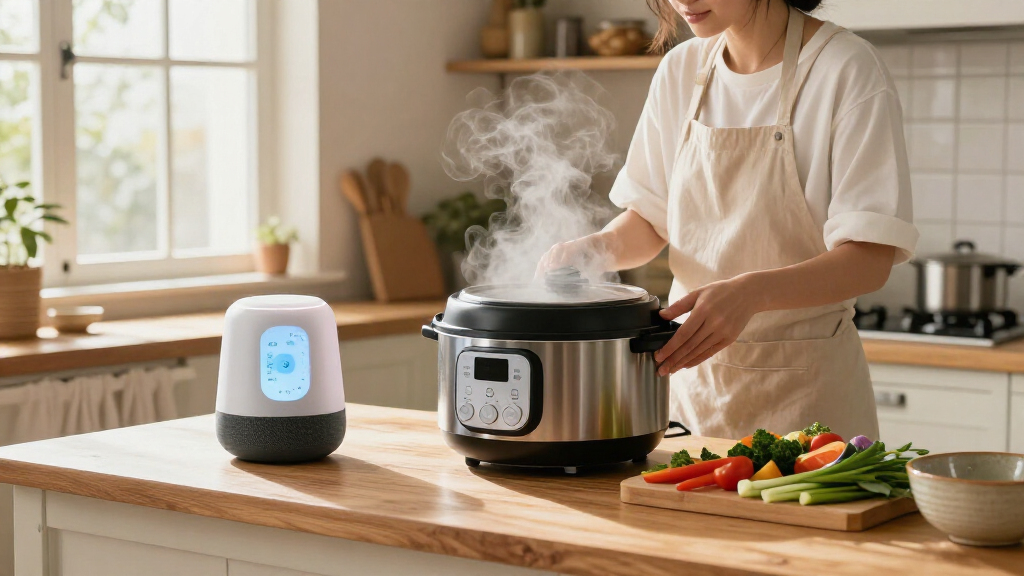
Remote start also calls for caution. Some ovens and cookers restrict it, and the product instructions may set conditions for safe use. Don’t leave an appliance running unattended unless its manufacturer specifically supports that use and you understand the risks. For instance, a person who starts a multicooker from another room should follow the manual’s guidance on setup, food, and supervision.
Set Realistic Expectations for Food Waste and Energy Savings
Smart kitchen gadgets can support meal planning, grocery reminders, and energy awareness, but they do not guarantee less waste or lower bills. Their effect depends on your habits, the appliance, local energy rates, and whether you keep the information current. A useful reminder can change what you cook; an inaccurate inventory can send you shopping for food you already have. The device provides information, but the saving comes only when someone uses it to change a purchase, meal, or appliance schedule.
Consider a household that buys spinach for several meals but forgets it behind the milk. A shared shopping list or a weekly “use soon” note may help the family plan a pasta dish before the leaves wilt. A refrigerator camera could also help, but if it misses a bag tucked in a drawer or miscounts containers, someone still has to correct the list. That creates a tradeoff: automation can reduce the effort of recording groceries, while manual review remains necessary to keep suggestions trustworthy. If corrections take longer than checking the fridge, a simple shared list may be the better system.
Energy scheduling and monitoring work the same way. A household might use a schedule to run a supported appliance at a time that suits its rates, but any savings depend on the appliance, local pricing, and actual use. A smart setting is a tool for changing a routine, not a promise of a particular bill reduction. Monitoring can also reveal when an appliance uses more energy than expected, but a reading is useful only if you can identify a practical adjustment and the device measures the relevant consumption.
- Food tracking: Choose a list that’s quick to update and easy for everyone in the household to use.
- Recipe suggestions: Check that the tool lets you review ingredients, substitutions, and any allergy concerns yourself.
- Energy features: Look for clear information about what the appliance measures and whether your energy provider’s rates matter.
The small habit often makes the difference: putting a shared list by the fridge and checking it before shopping can turn a reminder into a meal. Food apps and automation can help, but your labels, ingredient checks, and safe storage practices still matter.
Start Small and Let Your Routine Prove the Gadget Is Worthwhile
The simplest way to choose smart kitchen gadgets is to start with one recurring frustration and compare the connected solution with a basic one. A low-complexity tool, such as a connected thermometer, may be a sensible first buy if you cook meat or grill often. If you mainly want coffee ready when you wake up, first see whether a conventional timer already solves that problem. Starting with one device makes it easier to tell whether the feature changed your routine, rather than adding several new apps and habits at once.
Say you bake bread every Saturday and regularly lose track of dough temperature. You could compare a sensor or connected thermometer with a regular instant-read tool, then ask which one will actually change your routine. If an alert would let you handle other kitchen tasks without repeatedly checking, connectivity may earn its price. If you enjoy checking by hand, the cheaper device may feel better. Also consider the ongoing effort: charging, cleaning, pairing, and maintaining an account are small tasks, but they can outweigh a modest convenience if they interrupt a routine you already like.
- Write down the task you repeat and what goes wrong.
- Pick the feature that addresses it: monitoring, scheduling, measurement, reminders, or guided cooking.
- Compare full costs: include a subscription, hub, replacement probes, filters, or other accessories where relevant.
- Verify core operation without the app. Find out which controls and cooking functions remain available offline.
- Check support and upkeep. Read the warranty, cleaning instructions, update information, and parts policy.
After a few weeks, notice whether the gadget prevented the original problem and whether you still use its connected feature. That gives you a more useful measure of value than the number of functions on the product page. Smart kitchen gadgets can make cooking and food storage easier, from a simple app-connected thermometer to an inventory reminder. But a gadget that clutters the counter and asks you to manage another account may add work instead of removing it. Choose the smallest feature set that will keep helping after the novelty fades.
Frequently Asked Questions
What counts as a smart kitchen gadget?
A smart kitchen gadget uses connectivity, sensors, software, or automation to monitor or guide a kitchen task. Examples include app-connected thermometers, smart scales, programmable appliances, and food inventory apps.
Are smart kitchen appliances worth the extra cost?
They can be worth it when a feature solves a problem you face often. Compare the extra cost with how frequently you’ll use the feature, and check whether a conventional model already offers the same scheduling or measurement.
Do smart kitchen gadgets work without Wi-Fi?
Some retain their basic cooking or measuring functions, while app control, cloud recipes, alerts, and integrations may stop. Check the exact model’s instructions to see what remains available offline.
Are smart kitchen gadgets safe to use?
Connectivity alone does not make a kitchen device safe or unsafe. Follow the appliance instructions, check food with a thermometer when appropriate, and do not rely on an app estimate as proof that food is safely cooked.
Can smart gadgets reduce food waste or energy bills?
They may help you plan meals, notice food, schedule appliances, or monitor energy use, but results depend on accuracy and your routine. A grocery list only helps if you keep it updated, and energy savings depend on the appliance and local rates.
What should I check before buying a connected appliance?
Check compatibility with your phone or smart-home platform, offline controls, account or subscription requirements, privacy settings, software support, warranty, and replacement parts. Confirm the exact model’s supported features rather than relying on a general “smart” label.
Conclusion
Pick the kitchen task that trips you up most often, then choose a gadget that makes that task easier without making the rest of your routine harder. Check its offline controls, cost, support, and safety instructions before you buy.
The best smart feature is the one you still appreciate on a busy Tuesday, when dinner is sizzling and your hands are full.